Metadata-Version: 2.1
Name: isort
Version: 5.12.0
Summary: A Python utility / library to sort Python imports.
Home-page: https://pycqa.github.io/isort/
License: MIT
Keywords: Refactor,Lint,Imports,Sort,Clean
Author: Timothy Crosley
Author-email: timothy.crosley@gmail.com
Requires-Python: >=3.8.0
Classifier: Development Status :: 6 - Mature
Classifier: Environment :: Console
Classifier: Intended Audience :: Developers
Classifier: License :: OSI Approved :: MIT License
Classifier: Natural Language :: English
Classifier: Programming Language :: Python
Classifier: Programming Language :: Python :: 3
Classifier: Programming Language :: Python :: 3.8
Classifier: Programming Language :: Python :: 3.9
Classifier: Programming Language :: Python :: 3.10
Classifier: Programming Language :: Python :: 3.11
Classifier: Programming Language :: Python :: 3
Classifier: Programming Language :: Python :: 3 :: Only
Classifier: Programming Language :: Python :: 3.10
Classifier: Programming Language :: Python :: 3.11
Classifier: Programming Language :: Python :: 3.8
Classifier: Programming Language :: Python :: 3.9
Classifier: Programming Language :: Python :: Implementation :: CPython
Classifier: Programming Language :: Python :: Implementation :: PyPy
Classifier: Topic :: Software Development :: Libraries
Classifier: Topic :: Utilities
Provides-Extra: colors
Provides-Extra: pipfile-deprecated-finder
Provides-Extra: plugins
Provides-Extra: requirements-deprecated-finder
Requires-Dist: colorama (>=0.4.3) ; extra == "colors"
Requires-Dist: pip-api ; extra == "requirements-deprecated-finder"
Requires-Dist: pip-shims (>=0.5.2) ; extra == "pipfile-deprecated-finder"
Requires-Dist: pipreqs ; extra == "pipfile-deprecated-finder" or extra == "requirements-deprecated-finder"
Requires-Dist: requirementslib ; extra == "pipfile-deprecated-finder"
Requires-Dist: setuptools ; extra == "plugins"
Project-URL: Changelog, https://github.com/pycqa/isort/blob/main/CHANGELOG.md
Project-URL: Documentation, https://pycqa.github.io/isort/
Project-URL: Repository, https://github.com/pycqa/isort
Description-Content-Type: text/markdown
[](https://pycqa.github.io/isort/)
------------------------------------------------------------------------
[](https://badge.fury.io/py/isort)
[](https://github.com/pycqa/isort/actions?query=workflow%3ATest)
[](https://github.com/pycqa/isort/actions?query=workflow%3ALint)
[](https://codecov.io/gh/pycqa/isort)
[](https://pypi.org/project/isort/)
[](https://gitter.im/timothycrosley/isort?utm_source=badge&utm_medium=badge&utm_campaign=pr-badge&utm_content=badge)
[](https://pepy.tech/project/isort)
[](https://github.com/psf/black)
[](https://pycqa.github.io/isort/)
[](https://deepsource.io/gh/pycqa/isort/?ref=repository-badge)
_________________
[Read Latest Documentation](https://pycqa.github.io/isort/) - [Browse GitHub Code Repository](https://github.com/pycqa/isort/)
_________________
isort your imports, so you don't have to.
isort is a Python utility / library to sort imports alphabetically, and
automatically separated into sections and by type. It provides a command line
utility, Python library and [plugins for various
editors](https://github.com/pycqa/isort/wiki/isort-Plugins) to
quickly sort all your imports. It requires Python 3.8+ to run but
supports formatting Python 2 code too.
- [Try isort now from your browser!](https://pycqa.github.io/isort/docs/quick_start/0.-try.html)
- [Using black? See the isort and black compatibility guide.](https://pycqa.github.io/isort/docs/configuration/black_compatibility.html)
- [isort has official support for pre-commit!](https://pycqa.github.io/isort/docs/configuration/pre-commit.html)
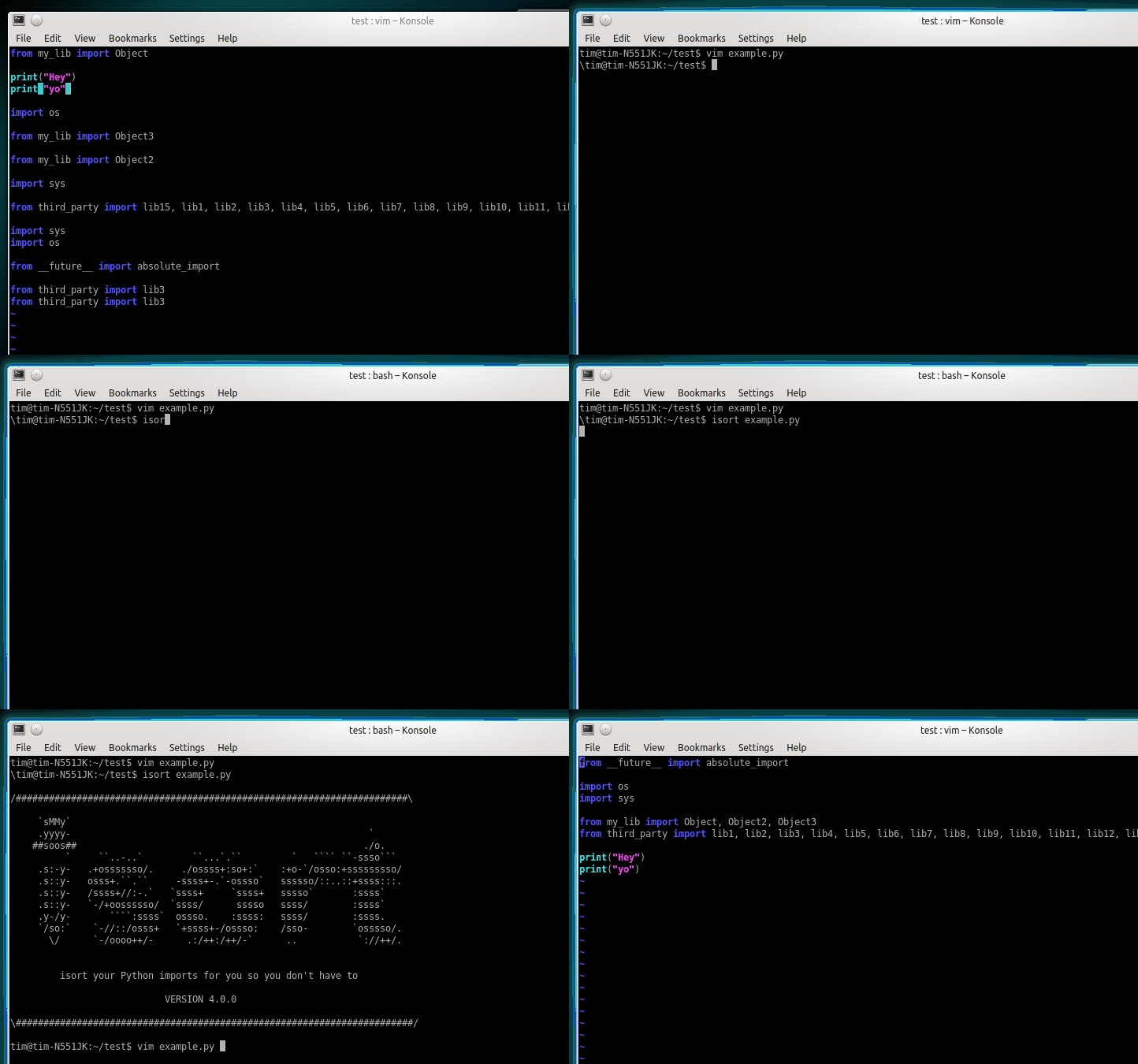
Before isort:
```python
from my_lib import Object
import os
from my_lib import Object3
from my_lib import Object2
import sys
from third_party import lib15, lib1, lib2, lib3, lib4, lib5, lib6, lib7, lib8, lib9, lib10, lib11, lib12, lib13, lib14
import sys
from __future__ import absolute_import
from third_party import lib3
print("Hey")
print("yo")
```
After isort:
```python
from __future__ import absolute_import
import os
import sys
from third_party import (lib1, lib2, lib3, lib4, lib5, lib6, lib7, lib8,
lib9, lib10, lib11, lib12, lib13, lib14, lib15)
from my_lib import Object, Object2, Object3
print("Hey")
print("yo")
```
## Installing isort
Installing isort is as simple as:
```bash
pip install isort
```
Install isort with requirements.txt support:
```bash
pip install isort[requirements_deprecated_finder]
```
Install isort with Pipfile support:
```bash
pip install isort[pipfile_deprecated_finder]
```
Install isort with both formats support:
```bash
pip install isort[requirements_deprecated_finder,pipfile_deprecated_finder]
```
## Using isort
**From the command line**:
To run on specific files:
```bash
isort mypythonfile.py mypythonfile2.py
```
To apply recursively:
```bash
isort .
```
If [globstar](https://www.gnu.org/software/bash/manual/html_node/The-Shopt-Builtin.html)
is enabled, `isort .` is equivalent to:
```bash
isort **/*.py
```
To view proposed changes without applying them:
```bash
isort mypythonfile.py --diff
```
Finally, to atomically run isort against a project, only applying
changes if they don't introduce syntax errors:
```bash
isort --atomic .
```
(Note: this is disabled by default, as it prevents isort from
running against code written using a different version of Python.)
**From within Python**:
```python
import isort
isort.file("pythonfile.py")
```
or:
```python
import isort
sorted_code = isort.code("import b\nimport a\n")
```
## Installing isort's for your preferred text editor
Several plugins have been written that enable to use isort from within a
variety of text-editors. You can find a full list of them [on the isort
wiki](https://github.com/pycqa/isort/wiki/isort-Plugins).
Additionally, I will enthusiastically accept pull requests that include
plugins for other text editors and add documentation for them as I am
notified.
## Multi line output modes
You will notice above the \"multi\_line\_output\" setting. This setting
defines how from imports wrap when they extend past the line\_length
limit and has [12 possible settings](https://pycqa.github.io/isort/docs/configuration/multi_line_output_modes.html).
## Indentation
To change the how constant indents appear - simply change the
indent property with the following accepted formats:
- Number of spaces you would like. For example: 4 would cause standard
4 space indentation.
- Tab
- A verbatim string with quotes around it.
For example:
```python
" "
```
is equivalent to 4.
For the import styles that use parentheses, you can control whether or
not to include a trailing comma after the last import with the
`include_trailing_comma` option (defaults to `False`).
## Intelligently Balanced Multi-line Imports
As of isort 3.1.0 support for balanced multi-line imports has been
added. With this enabled isort will dynamically change the import length
to the one that produces the most balanced grid, while staying below the
maximum import length defined.
Example:
```python
from __future__ import (absolute_import, division,
print_function, unicode_literals)
```
Will be produced instead of:
```python
from __future__ import (absolute_import, division, print_function,
unicode_literals)
```
To enable this set `balanced_wrapping` to `True` in your config or pass
the `-e` option into the command line utility.
## Custom Sections and Ordering
isort provides configuration options to change almost every aspect of how
imports are organized, ordered, or grouped together in sections.
[Click here](https://pycqa.github.io/isort/docs/configuration/custom_sections_and_ordering.html) for an overview of all these options.
## Skip processing of imports (outside of configuration)
To make isort ignore a single import simply add a comment at the end of
the import line containing the text `isort:skip`:
```python
import module # isort:skip
```
or:
```python
from xyz import (abc, # isort:skip
yo,
hey)
```
To make isort skip an entire file simply add `isort:skip_file` to the
module's doc string:
```python
""" my_module.py
Best module ever
isort:skip_file
"""
import b
import a
```
## Adding or removing an import from multiple files
isort can be ran or configured to add / remove imports automatically.
[See a complete guide here.](https://pycqa.github.io/isort/docs/configuration/add_or_remove_imports.html)
## Using isort to verify code
The `--check-only` option
-------------------------
isort can also be used to verify that code is correctly formatted
by running it with `-c`. Any files that contain incorrectly sorted
and/or formatted imports will be outputted to `stderr`.
```bash
isort **/*.py -c -v
SUCCESS: /home/timothy/Projects/Open_Source/isort/isort_kate_plugin.py Everything Looks Good!
ERROR: /home/timothy/Projects/Open_Source/isort/isort/isort.py Imports are incorrectly sorted.
```
One great place this can be used is with a pre-commit git hook, such as
this one by \@acdha:
This can help to ensure a certain level of code quality throughout a
project.
## Git hook
isort provides a hook function that can be integrated into your Git
pre-commit script to check Python code before committing.
[More info here.](https://pycqa.github.io/isort/docs/configuration/git_hook.html)
## Setuptools integration
Upon installation, isort enables a `setuptools` command that checks
Python files declared by your project.
[More info here.](https://pycqa.github.io/isort/docs/configuration/setuptools_integration.html)
## Spread the word
[](https://pycqa.github.io/isort/)
Place this badge at the top of your repository to let others know your project uses isort.
For README.md:
```markdown
[](https://pycqa.github.io/isort/)
```
Or README.rst:
```rst
.. image:: https://img.shields.io/badge/%20imports-isort-%231674b1?style=flat&labelColor=ef8336
:target: https://pycqa.github.io/isort/
```
## Security contact information
To report a security vulnerability, please use the [Tidelift security
contact](https://tidelift.com/security). Tidelift will coordinate the
fix and disclosure.
## Why isort?
isort simply stands for import sort. It was originally called
"sortImports" however I got tired of typing the extra characters and
came to the realization camelCase is not pythonic.
I wrote isort because in an organization I used to work in the manager
came in one day and decided all code must have alphabetically sorted
imports. The code base was huge - and he meant for us to do it by hand.
However, being a programmer - I\'m too lazy to spend 8 hours mindlessly
performing a function, but not too lazy to spend 16 hours automating it.
I was given permission to open source sortImports and here we are :)
------------------------------------------------------------------------
[Get professionally supported isort with the Tidelift
Subscription](https://tidelift.com/subscription/pkg/pypi-isort?utm_source=pypi-isort&utm_medium=referral&utm_campaign=readme)
Professional support for isort is available as part of the [Tidelift
Subscription](https://tidelift.com/subscription/pkg/pypi-isort?utm_source=pypi-isort&utm_medium=referral&utm_campaign=readme).
Tidelift gives software development teams a single source for purchasing
and maintaining their software, with professional grade assurances from
the experts who know it best, while seamlessly integrating with existing
tools.
------------------------------------------------------------------------
Thanks and I hope you find isort useful!
~Timothy Crosley